This module is one of the Administrator Tools. It configures all the parameters that concern Audiqueen. It comprises a long comprehensive list of all possible settings for Audiqueen, including the other ones covered by the other buttons in the Administrator Tools, such as A§E default settings, the settings that are typically set in the Format window of the ribbon, Datafile storage path (if enabled), EMR integration settings (context or HL7), Keywords, Events, Windows Active Directory integration, NOAH integration, update strategy, etc.
These settings should only be touched by an administrator under the supervision of Otoconsult. Donot hesitate to request assistance from Otoconsult. In that case, Otoconsult may send you a configuration file that contains several parameter settings. You can then import this file.
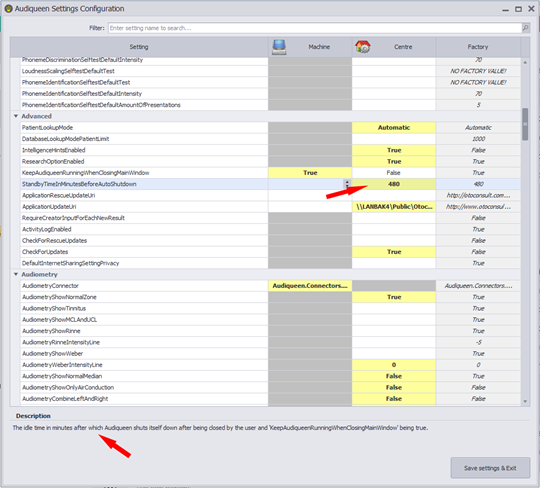
The parameter list. When selecting a parameter (upper arrow), Audiqueen describes the feature (lower arrow) to assist the administrator.
The value that is in effect has a yellow background. A dark grey background means this setting is not available in this scope.
The grid shows the Factory setting of each parameter. You can overwrite this in the Centre column or, for parameters that are bound to a physical workstation, in the Machine column.
It is also possible to request assistance from Otoconsult. In that case, Otoconsult may send you a configuration file that contains several parameter settings. You can import this file here.
Machine settings have priority over centre settings which have priority over factory settings.
Was this article helpful?
That’s Great!
Thank you for your feedback
Sorry! We couldn't be helpful
Thank you for your feedback
Feedback sent
We appreciate your effort and will try to fix the article